MX Email Connection: Difference between revisions
From Apps for Creatio
Created page with "== Connecting Your Email to MobileX == To connect your email account to MobileX, click '''Connection'''. You can choose one of two connection methods: # '''Sign in with Microsoft''' #* Click the '''Sign in with Microsoft''' button. #* Follow the on-screen prompts to complete the sign-in process.709x709px # '''Add an IMAP Connection''' #* Enter your email account details. #* Click '''Register''' to save and connect your account. #* File:B8..." |
No edit summary |
||
| Line 1: | Line 1: | ||
To connect your email account to MobileX, click '''Connection'''. | To connect your email account to MobileX, click '''Connection'''. | ||
Latest revision as of 05:50, 1 July 2026
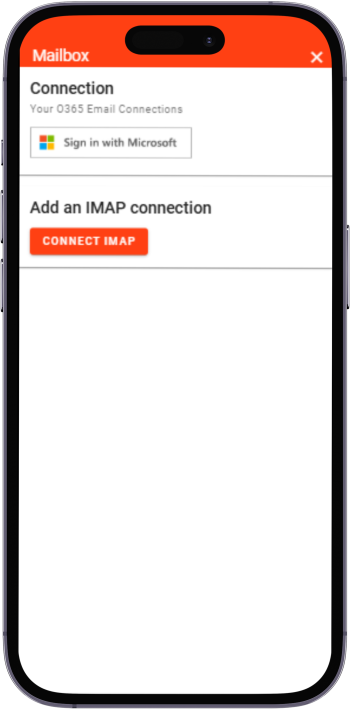
To connect your email account to MobileX, click Connection.
You can choose one of two connection methods:
- Sign in with Microsoft
- Click the Sign in with Microsoft button.
- Follow the on-screen prompts to complete the sign-in process.
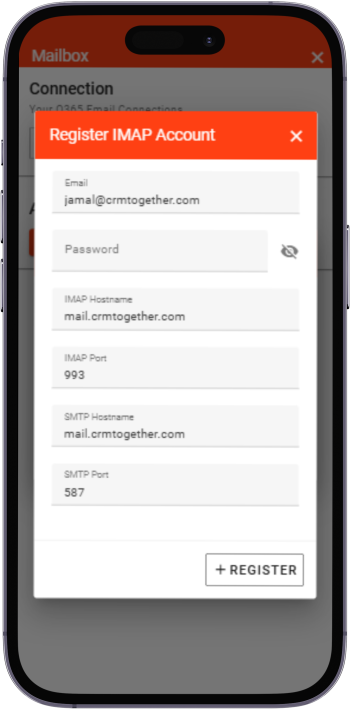
- Add an IMAP Connection
- Enter your email account details.
- Click Register to save and connect your account.
.png)
.png)

